user@devops:~$ cat README.md
mount-watch
# Description
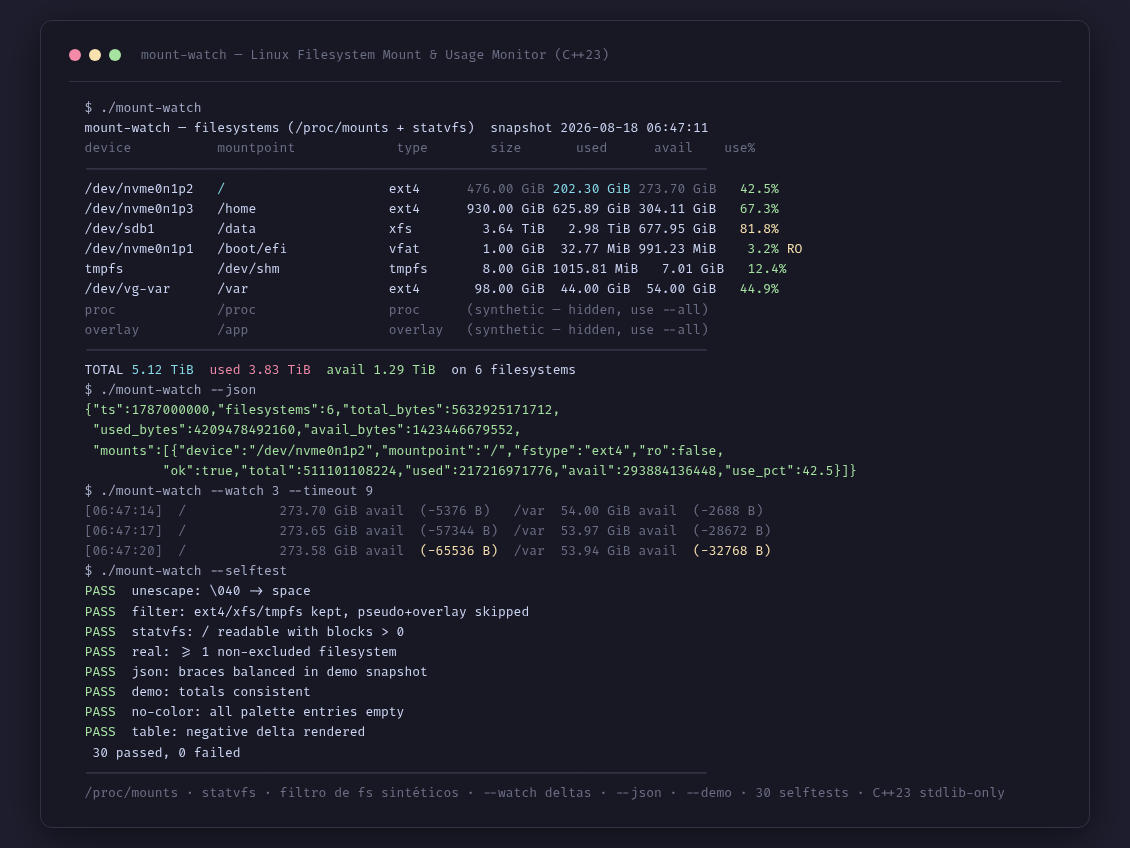
mount-watch (cpp-mount-watch) is a Linux filesystem monitor written in C++23 with zero external dependencies. It reads /proc/mounts from the kernel and calls statvfs(2) on every mount point to get real usage: total blocks (f_blocks x f_frsize), used (f_blocks - f_bfree) and user-available space (f_bavail, without the root reserve). It filters out pseudo/synthetic filesystems by default (proc, sysfs, devpts, cgroup, overlay, squashfs...) and only shows real data filesystems (ext4, xfs, btrfs, vfat, tmpfs...) with --all to see everything. It decodes the octal escapes of /proc/mounts (\040 = space, \134 = backslash). It detects read-only mounts via the ro flag in the options. Watch mode (--watch N) refreshes periodically and shows the available-space delta per filesystem between frames ((+N)/(-N) bytes), with --timeout T for automatic exit (ideal for cron). JSON output (--json) emits a full snapshot: ts, filesystems, total_bytes, used_bytes, avail_bytes and mounts[] with device, mountpoint, fstype, ro, ok, total, used, avail and use_pct, validated with python3 -m json.tool. --demo uses realistic synthetic data (6 filesystems + 2 hidden synthetic) for containers/VMs. --no-color uses a mutable ANSI palette that is fully emptied. 30 self-tests (--selftest): escape decoding, type filtering, real statvfs on /, human units, total consistency, balanced-brace JSON, watch deltas and table rendering. Zero dependencies: direct build with g++ -std=c++23.
# Key features
$ /proc/mounts parsing + statvfs(2) per mount point: total, used, available (f_bavail without root reserve) and real usage %
$ Pseudo/synthetic filesystem filter (proc, sysfs, devpts, cgroup, overlay, squashfs...) with --all to show them
$ Octal escape decoding from /proc/mounts (\040 = space, \134 = backslash) and read-only detection via the ro flag
$ Watch mode (--watch N) with available-space delta per filesystem between frames and --timeout T for cron
$ JSON output (--json) with full snapshot validated with python3 -m json.tool
$ --demo with realistic synthetic data (6 filesystems + 2 hidden synthetic) for containers/VMs
$ --no-color with mutable ANSI palette (ESC byte grep = 0) and usage colors (green < 75 %, yellow 75-90 %, red >= 90 %)
$ 30 self-tests (--selftest): escapes, filter, statvfs, units, JSON, deltas and table
# Gallery
# Technologies used